Compress agent context for performance
As an ADK agent runs it collects context information, including user instructions, retrieved data, tool responses, and generated content. As the size of this context data grows, agent processing times typically also increase. More and more data is sent to the generative AI model used by the agent, increasing processing time and slowing down responses. The ADK Context Compaction feature is designed to reduce the size of context as an agent is running by summarizing older parts of the agent workflow event history.
What is compaction?
Compaction manages token usage by trimming or summarizing older session history—including instructions, inputs, and model responses. By maintaining a compact context window, this process optimizes latency and reduces costs while ensuring the agent retains access to essential recent interactions.
Compaction is integrated directly into SingleFlow via the CompactionRequestProcessor,
allowing automatic event compaction based on the rules you set in the EventsCompactionConfig.
Choosing your strategy
You can manage your session's data using two different strategies within EventsCompactionConfig:
- Token-Based (Primary): Triggers cleanup based on the actual volume of tokens consumed. This acts as an absolute safety net and is ideal for unpredictable workloads, like when users paste massive code blocks or upload large files.
- Sliding Window (Turn-Based): Triggers cleanup after a fixed number of conversational turns. This is useful for regular, predictable text chats.
When both are configured, token-based compaction takes priority. If the session length crosses your defined token threshold on a given turn, token-based compaction fires, and the standard sliding-window compaction is skipped for that turn.
Token based compaction
As stated above, Token-based compaction triggers context management based on the volume of data (tokens) rather than the number of turns (events).
Configuration settings
Add token-based compaction to your agent workflow by adding an EventsCompactionConfig setting to the App object. You must specify the following:
- token_threshold: The safety limit of tokens that automatically triggers tail-retention compaction once reached.
- event_retention_size: The number of recent events/interactions kept in "raw" un-compacted format when compaction is triggered. This maintains immediate conversational context and pronoun resolution.
To implement this in your project, use the following configuration:
```python
1. Correct the import path to use the google.adk namespace
from google.adk.apps.app import App, EventsCompactionConfig from google.adk.agents import Agent # Or import your specific agent class
Initialize your root agent (required for App setup)
root_agent = Agent( name="my_root_agent", description="Main coordinating agent for the workflow." )
Configure the application workflow with a valid compaction setup
compaction_config = EventsCompactionConfig( # REQUIRED SLIDING WINDOW PARAMETERS (No defaults) compaction_interval=10, # Number of turns between standard compactions overlap_size=2, # Number of events to retain as overlapping context
# TOKEN-BASED PARAMETERS (Activates the priority/pre-call layer)
token_threshold=4000,     # Triggers compaction when actual token count exceeds this
event_retention_size=5    # Number of recent raw events to keep intact when token limit is hit
)
2. Register with required name and root_agent fields
app = App( name="my_compacting_agent_app", root_agent=root_agent, events_compaction_config=compaction_config ) ```
Sliding window compaction
The Context Compaction feature uses a sliding window approach for collecting and summarizing agent workflow event data within a Session. When you configure this feature in your agent, it summarizes data from older events once it reaches a threshold of a specific number of workflow events, or invocations, with the current Session.
Configure context compaction
Add context compaction to your agent workflow by adding an Events Compaction
Configuration setting to the App object (Python/Java) or by configuring contextCompactors
on the LlmAgent (TypeScript). As part of the
configuration, you must specify a compaction interval and overlap size (Python/Java)
or a token threshold and event retention size (TypeScript), as shown
in the following sample code:
```python from google.adk.apps.app import App from google.adk.apps.app import EventsCompactionConfig
app = App( name='my-agent', root_agent=root_agent, events_compaction_config=EventsCompactionConfig( compaction_interval=3, # Trigger compaction every 3 new invocations. overlap_size=1 # Include last invocation from the previous window. ), ) ```
```java import com.google.adk.apps.App; import com.google.adk.summarizer.EventsCompactionConfig;
App app = App.builder() .name("my-agent") .rootAgent(rootAgent) .eventsCompactionConfig(EventsCompactionConfig.builder() .compactionInterval(3) // Trigger compaction every 3 new invocations. .overlapSize(1) // Include last invocation from the previous window. .build()) .build(); ```
```typescript import {Gemini, LlmAgent, LlmSummarizer, TokenBasedContextCompactor} from '@google/adk';
const agent = new LlmAgent({ name: 'my-agent', model: 'gemini-flash-latest', contextCompactors: [ new TokenBasedContextCompactor({ tokenThreshold: 1000, // Trigger compaction when session exceeds 1000 tokens. eventRetentionSize: 1, // Keep at least 1 raw event (overlap). summarizer: new LlmSummarizer({ llm: new Gemini({model: 'gemini-flash-latest'}), }), }), ], }); ```
Once configured, the ADK Runner handles the compaction process in the
background each time the session reaches the interval.
Example of context compaction
If you set compaction_interval to 3 and overlap_size to 1, the event data is
compressed upon completion of events 3, 6, 9, and so on. The overlap setting
increases size of the second summary compression, and each summary afterwards,
as shown in Figure 1.
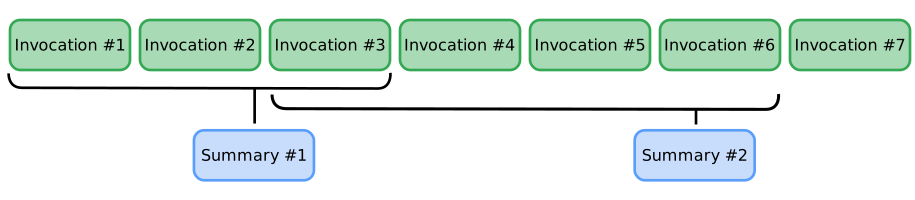 Figure 1. Illustration of event compaction configuration with an interval of 3
and overlap of 1.
Figure 1. Illustration of event compaction configuration with an interval of 3
and overlap of 1.
With this example configuration, the context compression tasks happen as follows:
- Event 3 completes: All 3 events are compressed into a summary
- Event 6 completes: Events 3 to 6 are compressed, including the overlap of 1 prior event
- Event 9 completes: Events 6 to 9 are compressed, including the overlap of 1 prior event
Configuration settings
The configuration settings for this feature control how frequently event data is compressed and how much data is retained as the agent workflow runs. Optionally, you can configure a compactor object
compaction_interval: Set the number of completed events that triggers compaction of the prior event data.overlap_size: Set how many of the previously compacted events are included in a newly compacted context set.summarizer: (Optional) Define a summarizer object including a specific AI model to use for summarization. For more information, see Define a Summarizer.
Define a Summarizer
You can customize the process of context compression by defining a summarizer.
The LlmEventSummarizer (Python/Java) or LlmSummarizer (TypeScript) class allows
you to specify a particular model for summarization.
The following code example demonstrates how to define and configure a custom summarizer:
```python from google.adk.apps.app import App, EventsCompactionConfig from google.adk.apps.llm_event_summarizer import LlmEventSummarizer from google.adk.models import Gemini
Define the AI model to be used for summarization:
summarization_llm = Gemini(model="gemini-flash-latest")
Create the summarizer with the custom model:
my_summarizer = LlmEventSummarizer(llm=summarization_llm)
Configure the App with the custom summarizer and compaction settings:
app = App( name='my-agent', root_agent=root_agent, events_compaction_config=EventsCompactionConfig( compaction_interval=3, overlap_size=1, summarizer=my_summarizer, ), ) ```
```java import com.google.adk.apps.App; import com.google.adk.models.Gemini; import com.google.adk.summarizer.EventsCompactionConfig; import com.google.adk.summarizer.LlmEventSummarizer;
// Define the AI model to be used for summarization: Gemini summarizationLlm = Gemini.builder() .model("gemini-flash-latest") .build();
// Create the summarizer with the custom model: LlmEventSummarizer mySummarizer = new LlmEventSummarizer(summarizationLlm);
// Configure the App with the custom summarizer and compaction settings: App app = App.builder() .name("my-agent") .rootAgent(rootAgent) .eventsCompactionConfig(EventsCompactionConfig.builder() .compactionInterval(3) .overlapSize(1) .summarizer(mySummarizer) .build()) .build(); ```
```typescript import {Gemini, LlmAgent, LlmSummarizer, TokenBasedContextCompactor} from '@google/adk';
// Define the AI model to be used for summarization: const summarizationLlm = new Gemini({model: 'gemini-flash-latest'});
// Create the summarizer with the custom model: const mySummarizer = new LlmSummarizer({llm: summarizationLlm});
// Configure the agent with the custom summarizer and compaction settings: const agent = new LlmAgent({ name: 'my-agent', model: 'gemini-flash-latest', contextCompactors: [ new TokenBasedContextCompactor({ tokenThreshold: 1000, eventRetentionSize: 1, summarizer: mySummarizer, }), ], }); ```
You can further refine the compactor by modifying its summarizer. In Python and Java,
customize the prompt_template on LlmEventSummarizer. In TypeScript, customize
the prompt on LlmSummarizer. For more details, see the
LlmEventSummarizer code or
LlmSummarizer code.